
Walking Route History and Route Details
Streets keeps a clear history of every completed route so past walks become useful for future exploration.
What this feature does
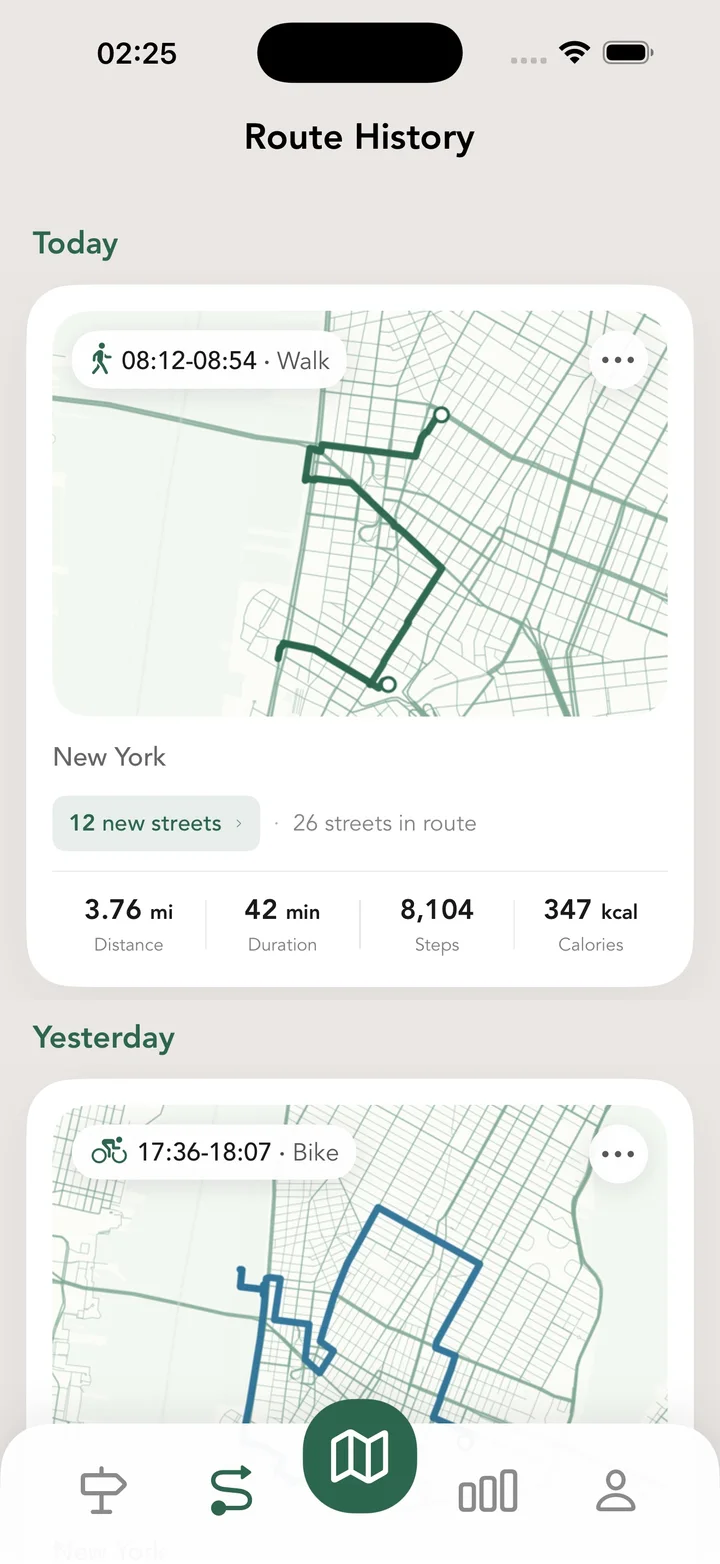
Route history is where your walks become a record. Streets shows route previews, opens detailed route maps, stores notes, lets you trim the start or end of a route, and creates shareable route cards with useful walking results and newly discovered streets.
Real Streets capabilities
- Route history for completed walks, runs, and rides.
- Active route displayed as a route in progress.
- Route preview mini-maps in history.
- Detailed route map with the recorded line.
- Trim the start or end of a route.
- Add a note to remember context from a walk.
- Share a polished card with route results.
- See how many new streets a route unlocked.
- Review the list of new streets discovered during one route.
How it works
Finish a route
Save a tracked activity when the walk, run, or ride is done.
Open history
Review route previews, stats, notes, and detailed map lines.
Edit or share
Trim the route if needed and share the result with a clean visual card.
Practical ways to use it
- Remember where a long walk actually went.
- Clean up a route if tracking started too early or ended too late.
- Share a route result after discovering new streets.
- Compare recent walking routes and street discoveries.
FAQ
Does Streets save route history?
Yes. Completed routes are saved in history with previews, details, stats, and route maps.
Can I edit a recorded route?
Yes. Streets lets you trim the beginning or end of a recorded route.
Can I add notes to a route?
Yes. You can add a route note to keep extra context about the walk.
Related guides
Walk every street with Streets
Find what is left, choose a new route, and move your city closer to 100%.